It is always a good decision to compare the products before you purchase. Luckily we live in an era where we have multiple choices, whether software or goods, no matter what we buy. Adobe is an excellent software if you want to work with vector images and is preferred by graphic designers worldwide. But in this article, we will be telling you about Adobe Illustrator alternative Mac. The reason for telling you best Illustrator alternative Mac is that it will help you decide a software according to your needs. So, please keep reading to know about it.

- Best Adobe Illustrator Alternative for Mac
- CorelDRAW
- Vectornator
- INKSPACE
- BOXY SVG
- Affinity Designer
- Sketch
- VectorStyler
- Figma
- Amandine
- Vectr
- Graphic
- Inker
- Vecteezy Editor
- Gravit Designer
- LUNACY
- DesignEvo
- Omber
- LazPaint
Best Adobe Illustrator Alternative for Mac
This article will discuss Adobe Illustrator alternative Mac and best Illustrator alternative Mac. We have also listed its features to help you make an informed decision. So please keep reading to know about it.
1. CorelDRAW

CorelDRAW is one of Adobe Illustrator alternative Mac. It is an easy-to-use app that allows you to make vector graphics. It also provides unlimited cloud storage, so your designs are always safe and available across devices. Some of its key features are listed below:
- CorelDRAW provides a free trial .
- Export formats include JPEG, PNG, PDF, SVG and SVGZ.
- With its help of it, nondestructive editing is possible.
- Full Google Fonts library is provided by it.
- It has extensive file compatibility.
- It is suitable for business and graphic designer.
- Apart from this, a design gallery is also there.
- The multipage view feature is also there.
- CorelDRAW is compatible with Windows.
- You can design for print or web with the help of CorelDRAW.
- Also, it is affordable.
2. Vectornator
Vectornator has made the professional design available for all. It is compatible with Apple devices and Windows. It provides Auto Trace Technology that will help you become efficient because you can do things with just a press of a button. Some of its excellent features are listed below:
- It provides you with Text editing tools .
- Apart from this, Vectornator allows you to create guides and templates .
- Moreover, its graphic design tool will take your designs to the next level.
- Vectornator enables you to convert any text into vector shapes.
- You will be able to custom fonts if you use Vectornator.
- It allows you to add signatures.
- You can custom brushes .
- Tutorials are also there to help you.
- It is user-friendly .
3. INKSPACE

INKSPACE also comes in the list of Best Illustrator alternative Mac. It is a perfect tool for a designer and illustrator. It is also the ideal software even if you are not a designer and illustrator but like to make vector images. Some of its key features are listed below:
- It provides a powerful text tool.
- INKSPACE provides flexible drawing tools .
- Learning resources are also offered by it.
- Apart from this, it provides you with a Colour selector .
- It is available for free .
- Also, it has a user-friendly interface.
- Moreover, it allows you to export files in PDF , PNG, DXF, and many more formats.
- You can easily share files with others.
4. BOXY SVG

BOXY SVG has an intuitive user interface . You can take most of the actions on canvas. Apart from this, you will be able to access many features with the help of keyboard shortcuts . Some of its key features are listed below:
- You can save SVG files to a disk.
- It is compatible with Mac and Windows.
- Moreover, you can save and host files in the cloud.
- Both professionals and beginners can use BOXY SVG.
- It allows you to edit SVG files .
- A web app is also there, so you can use that too.
- Apart from this, you can sync settings between devices .
5. Affinity Designer

Affinity Designer is one of the best Adobe Illustrator alternative Mac. It is also compatible with Windows. Apart from this, it is fast . It can handle even the most complex documents. It allows you to make vector graphics, so the quality of your graphics will not be affected even if the graphics are zoomed in. Some of its key features are listed below:
- It allows you to use Pixel preview mode .
- Affinity Designer has tools that will enable you to become efficient.
- You can customize keyboard shortcuts .
- It is a perfect tool for creating templates for social media .
- You can become efficient with the help of this tool.
- It is versatile.
- Also, it has powerful contour and zooming tools.
- It provides sophisticated typography options .
- Moreover, it is user-friendly.
- It provides a 30-day trial .
6. Sketch

Sketch is an easy-to-use vector graphics software. It also allows you to collaborate, making it a perfect tool for businesses as you can become efficient and resolve issues in real-time. Also, you can test the prototypes on your devices with the help of Figma. We have provided its key features that will help you decide which is the perfect choice for you:
- You can store files .
- It is an ideal web app.
- Moreover, Sketch offers powerful design tools to help you become efficient.
- Sketch allows you to customize workflow.
- It provides hassle-free handoff .
- Sketch also provides smart layouts .
- It allows you to make vector-based graphics.
7. VectorStyler

With the help of VectorStyler , you can make illustrations, logos, drawings, icons, typography and vector art. Also, if you want to add an inner or outer glow to shapes and objects, you can use this. Some of its key features are listed below:
- It is one of the best Adobe Illustrator alternative Mac.
- You can cut and merge intersecting shapes using the trim and join tool .
- You can place and edit text on any shape.
- VectorStyler allows you to add live image effects to vector objects.
- Also, you can create and edit real vector brushes.
- It will enable you to create a scatter brush .
- You can use the character tool.
- It allows you to apply colour filters on vector objects.
- Apart from this, you can create and edit nondestructive shapes.
- Moreover, the elastic warp effect and displacement effect are also possible.
8. Figma

Another best Illustrator alternative Mac is Figma . It allows you to work in a team. Apart from this, in FigJam, you can make diagrams and sticky notes. You will be able to receive feedback in real time with its help of it. Some of its key features are listed below:
If you use this software, less manual resizing will be required.
- Vector Networks allow you to draw in any direction.
- Centralized file management is possible with the help of Figma.
- Advanced drawings are also provided.
- You can upload videos.
- Third-party integrations are also possible with the help of Figma
- Figma Help centre and Figma Support Forum are also there.
- Your work gets automatically saved in Figma cloud software.
- It provides you with Advanced font features .
- It allows you to export PDF, SVG, PNG and JPG.
9. Amandine

Amandine is one of the best vector graphics software. You can use it even if you are an amateur but have a creative mind. You can download this app on App Store and Mac App Store. It offers every tool that will help you to show your creativity to the world. Some of its key features are listed below:
- It has an intuitive user interface.
- Moreover, you save vector images in SVG, PDF and EPS format.
- Amandine allows you to add depth to the illustrations that you have made.
- Apart from this, it has a recolour option .
- You can select and modify objects .
- Advanced drawing is possible with the help of this app.
- It has a width tool.
- You can save Amandine shapes into custom libraries.
- Also, it allows you to arrange sheets on the canvas.
- Using this tool, you can create multiple layers and sublayers.
- You will be able to convert points to smooth points.
- It allows you to create text in shapes .
- Apart from this, you can add multiple strokes and fills.
10. Vectr

Vectr is a free vector graphics editor. If you are looking for software that is easy to use and has powerful tools, then Vectr will be the perfect choice for you. Even if you are not a professional then, also you can use it because it provides you with intuitive tools that will guide you. Also, it has a low learning curve . Some of its key features are listed below:
- It allows you to share a real-time view of your activity.
- It allows you to vector-based graphics so you can scale without losing clarity.
- With the help of Vectr, you can create logos, presentations, cards, website mockups, brochures and 2D graphics.
- It has time-saving tools .
- Vectr also provides a chat feature .
- It is lightweight software .
- It is one of best Illustrator alternative Mac.
- Moreover, it is also compatible with Windows.
- It uses artificial intelligence.
11. Graphic

If you are looking for vector-based graphics software for your Mac, then Graphic is one of Adobe Illustrator alternative Mac. A user guide and Tutorials are also provided by it. You can fill the objects with vivid colours. We have listed some of its key features below:
- It has provided keyboard shortcuts that will help you become efficient.
- Moreover, brush tools allow you to create sleek calligraphic brushes .
- It is easy to create an arrowed line with the help of this software.
- Furthermore, the pen tools it provides will help you draw a complex path.
- With the help of a pencil, you can create a freehand path.
- The Graphic allows you to manage documents .
- Objects and points can be rotated, slanted and scaled on Graphics.
- With the help of Graphic, you can rotate, slant and scale points or objects.
- Arc tools are there that will help you to create a pie chart.
12. Inker

Another Adobe Illustrator alternative Mac is Inker . With the help of Inker, you can draw logos and typography. Also, it simplifies sketch inking . Not only this, it helps you create neat shapes. We have listed some of its key features, so keep reading to know about it:
- You can draw smooth lines .
- It allows you to adjust colours .
- Moreover, you can organize the colour palette.
- Using Inker, you can arrange created items.
- It is available for Android .
13. Vecteezy Editor

Another best Illustrator alternative Mac in the list is Vecteezy Editor . It is easy for beginners and a powerful tool for professionals . Apart from this, it is loaded with powerful features that will make the work easier for you. Some of its excellent features are listed below:
- It does not deal with layers.
- Apart from this, you will get access to thousands of free templates.
- It provides regular updates .
- It has provided keyboard shortcuts .
14. Gravit Designer

Gravit Designer is a cross-platform design tool. It has a user-friendly interface. Some of its excellent features are listed below:
- Quick prototyping is possible with the help of Gravit Designer.
- It offers you various tools such as knife tool, bezigon tool, advanced path tool , and more.
- You can export files in multiple formats.
- Also, you can apply multiple fills and borders to any object.
- Apart from this, you can add multiple indestructible effects .
15. LUNACY

If you are looking for Adobe Illustrator alternative Mac, then LUNACY is an excellent choice. It is available for free. Prototyping is possible with the help of LUNACY. We have listed some of its key features below:
- It has a Dummy Text Generator .
- LUNACY allows you to work in an offline mode .
- You can comment on canvas and prototypes.
- It is compatible with Windows and Linux.
- The dark mode is also there.
- It allows you to do vector manipulation .
16. DesignEvo

Another name in best Illustrator alternative Mac list is DesignEvo . Using this software, you can make online logos. Also, you can use more than 10,000 templates to create a logo. It is available for free. Some of its excellent features are provided below:
- It allows you to design a logo in 5 minutes.
- DesignEvo offers more than 100 fonts in various styles .
- Using it, you can make social media profile logos .
- DesignEvo is user-friendly .
- It has millions of free vector icons.
- You will be able to work with SVG and PDF files .
17. Omber

Omber is one of the best Adobe Illustrator alternative Mac. With its help, you can rescale, reshape and recolour the art you have created. Some of its key features are listed below:
- Using Omber, you can combine lines and shapes into complex meshes.
- It allows you to work with vector-based graphics.
- Apart from this, you can easily make dramatic colour blends .
- You can access the alpha channel of shapes.
- It allows you to manipulate images.
- Omber will enable you to group shapes together .
- Moreover, undo and redo options are also there.
- You can blend colours over lines .
18. LazPaint

LazPaint allows you to work with vector images. It is compatible with Windows, Linux, Raspberry Pi and Mac OS. We have listed some of its key features below:
- You can create and edit SVG images .
- It is free .
- Apart from that, it is lightweight software.
Recommended
- NanoCell vs QLED: Which TV is Better?
- How to Calculate Z Score in Excel
- Adobe Lightroom vs Lightroom Classic: What’s the Difference?
- 24 Best Adobe Illustrator Free Alternative
If you’re facing issues in printing your PDF files on Adobe Reader then don’t worry as the problem can be easily solved by updating printer’s driver, setting your printer as the default printer, etc. But before continuing you should try to print another PDF file and if you’re able to print successfully then the PDF file you were earlier trying to print was corrupted. But if you still can’t print pdf files from adobe reader then continue with the advanced troubleshooting guide.
- Fix Can’t Print PDF Files from Adobe Reader
- Method 1: Miscellaneous Fixes
- Method 2: Update Printers driver
- Method 3: Set your Printer as the Default Printer
- Method 4: Try to print PDF as an image
- Method 5: Save another copy of the PDF file
- Method 6: Reinstall your Printer Drivers
- Method 7: Re-install Acrobat Reader
Fix Can’t Print PDF Files from Adobe Reader
Make sure to create a restore point just in case something goes wrong.
Method 1: Miscellaneous Fixes
1.Try to print the webpage you’re currently on, press Ctrl + P and print the document and see if you’re able to.

2.Instead of PDF file try to print a text or images file , if you’re are able to print then the problem is with Adobe Reader and updating it might fix the issue.

3.Power Cycle the Printer:
- Restart your PC and power off the Printer then disconnect it from the PC.
- Don’t start the Printer, just press and hold the power button of the printer for 10 seconds.
- Now connect the printer to the PC then power ON the PC and once the system starts, you can power ON your printer.
Method 2: Update Printers driver
To update the printer driver follow these steps.
1.Press Windows key + X then select Device Manager.

2.Expand Print queues then select the printer for which you want to update the drivers.
3.Right-click on the selected Printer and select Update driver.

4.Select Search automatically for updated driver software.
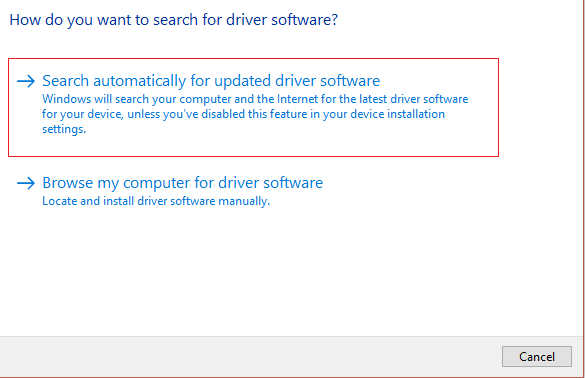
5.Windows will automatically install the latest drivers available for your printer.

Manually Install the Latest Printer Drivers
1.Press Windows Key + R then type “ services.msc ” and hit enter.
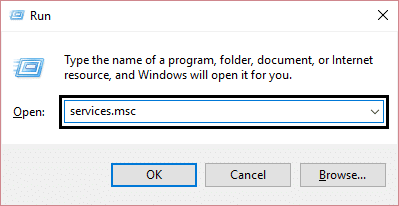
2.Find Print Spooler service then right-click on it and select Stop.

3.Again press Windows Key + R then type printui.exe /s /t2 and hit enter.
4.In the Printer Server Properties window search for the printer that is causing this issue, select it and then click on the Remove button.
5.Next, remove the printer and when asked for confirmation to remove the driver as well, select yes.

6.Now again go to services.msc and right-click on Print Spooler and select Start.

7.Next, navigate to your printer manufacturer’s website like HP , Dell , Canon , download and install the latest printer drivers from the website.
For example , in case you have an HP printer then you need to visit HP Software and Drivers Downloads page . Where you can easily download the latest drivers for your HP printer.
8.If you’re still not able to fix slow network printing error or can’t Print PDF Files from Adobe Reader then you can use the printer software that came with your printer. Usually, these utilities can detect the printer on the network and fix any issues that are causing the printer to appear offline.
For example, you can use HP Print and Scan Doctor to fix any issues regarding HP Printer.
Method 3: Set your Printer as the Default Printer
1.Press Windows Key + R then type control and hit Enter to open Control Panel.
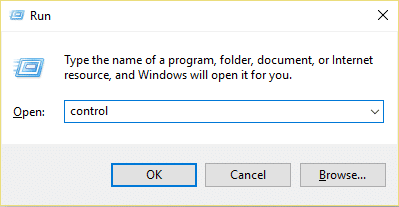
2.From the Control Panel click on Hardware and Sound.

3.Next, click on Device and Printers.

- Right-click on your Printer and select Set as default printer.

5.Restart your PC to save changes.
Method 4: Try to print PDF as an image
1.First, open your PDF file in Acrobat Reader.

2.Now from the Adobe Reader toolbar click on the print icon or press Ctrl + P.
3.From the print window, click on the Advanced button.

4.In the Advanced Print Setup window checkmark “ Print As Image ” and click OK.
<img loading=“lazy” src=“https://techcult.com/wp-content/uploads/2019/10/From-the-print-window-click-on-the-Advanced-button.png" onerror=“this.onerror=null;this.src=‘https://blogger.googleusercontent.com/img/a/AVvXsEhe7F7TRXHtjiKvHb5vS7DmnxvpHiDyoYyYvm1nHB3Qp2_w3BnM6A2eq4v7FYxCC9bfZt3a9vIMtAYEKUiaDQbHMg-ViyGmRIj39MLp0bGFfgfYw1Dc9q_H-T0wiTm3l0Uq42dETrN9eC8aGJ9_IORZsxST1AcLR7np1koOfcc7tnHa4S8Mwz_xD9d0=s16000';" alt=“In the Advanced Print Setup window checkmark “Print As Image” and click OK - 35”>
5.Next, click the Print button and see if you’re able to print the PDF file as an image.

Method 5: Save another copy of the PDF file
1.Open the PDF file in Acrobat Reader then press Shift + Ctrl + S to open Save As dialog box.

Note: From the Acrobat Reader menu click on File and select Save As.
2.Navigate to where you want to save the file, type a new name and click Save.

3.Now try to print this newly created PDF and see if you’re able to Fix Can’t Print PDF Files from Adobe Reader.
Method 6: Reinstall your Printer Drivers
1.Press Windows Key + R then type control printers and hit Enter to open Devices and Printers.

- Right-click on your printer and select “ Remove device ” from the context menu.

3.When the confirm dialog box appears , click Yes.

4.After the device is successfully removed, download the latest drivers from your printer manufacturer website .
5.Then reboot your PC and once the system restarts, press Windows Key + R then type control printers and hit Enter.
Note: Make sure your printer is connected to the PC via USB, ethernet or wirelessly.
6.Click on the “ Add a printer ” button under Device and Printers window.

7.Windows will automatically detect the printer, select your printer and click Next.

- Set your printer as default and click Finish.

This is how you can update the driver and after this, you can try to print the documents once again.
Method 7: Re-install Acrobat Reader
1.Press Windows Key + I to open Settings then click on Apps.

2.From the left hand make sure to select Apps & features.
3.Now from the “ Search this list ” box type Acrobat in it.

4.Click on Adobe Acrobat Reader DC then click on the Uninstall button under it.

5.Now download the latest version Adobe Acrobat Reader from the official website .
6.Install the latest version of Acrobat Reader on your PC and Reboot your PC.
7.Again try to print the PDF file and this time you will be able to print it without any issues.
Recommended:
- Fix Windows Media Player Server Execution Failed Error
- 3 Ways to Delete Files Protected by TrustedInstaller
- How to Connect a Bluetooth Device on Windows 10
- How to Format Hard Drive on Windows 10
I hope the above steps were able to help you Fix Can’t Print PDF Files from Adobe Reader but if you still have any queries regarding this guide then feel free to ask them in the comment’s section.

