Windows updates may improve security and enhance the user experience. But when the developers are going to update the process of an update? Is there any scope for improvement there? No matter what, there’s always some kind of error, missing element, or takes a super long time to complete. Just google Windows update memes, I promise you won’t stop laughing. This time the error is regarding Windows system components. If you are also dealing with the same problem, you are at the right place. We bring you a perfect guide that will help you fix components of Windows operating system errors.

- How to Fix Windows System Components Must be Repaired Issue
- Method 1: Basic Troubleshooting Steps
- Method 2: Boot into Safe Mode
- Method 3: Run Windows Update Troubleshooter
- Method 4: Change Date & Time Zone
- Method 5: Repair System Files
- Method 6: Reset Windows System Components
- Method 7: Reset Windows Update Components
- Method 8: Reset PC
How to Fix Windows System Components Must be Repaired Issue
This problem may occur due to possible reasons listed below;
- Corrupted system files.
- Fragmented Windows update components.
- Unable to verify the Windows installation version.
Method 1: Basic Troubleshooting Steps
Before installing a new update, always check and complete the following basic tasks. Not most of the time, however, it is likely that these minor issues can lead to an error message of components of Windows operating system must be repaired.
- Make sure you have more than enough storage space. A minimum of 16-20 GB is required.
- Unplug any unnecessary external devices.
- Make a backup of your important files and data. Also, delete/uninstall any unwanted apps or files.
- Uninstall antivirus software, which may interfere with the update installation.
Method 2: Boot into Safe Mode
Turning on your PC in safe mode will prevent any third-party application to interfere which might be causing the error of windows system components must be repaired. Safe mode boots with only necessary programs and functionality, which automatically restricts unnecessary apps and will help to complete the update process. To boot in safe mode, Read our guide on How to Boot to Safe Mode in Windows 10 to do the same.

If booting into Safe Mode did not fix the issue, then you can also try Windows Update troubleshooter in safe mode from the next method.
Method 3: Run Windows Update Troubleshooter
This troubleshooter will automatically identify all the issues regarding updates and fix any errors that are preventing windows from updating. Follow these steps to run Windows Update troubleshooter .

Try updating it again after it boots. If the error message Windows system components must be repaired continues to occur, proceed to the next method listed below.
Method 4: Change Date & Time Zone
Not always, but in some cases, the incorrect date and time can cause errors in Windows operating system components must be repaired. To check or change the date and time zone, do the following:
Right-click on Windows icon and click on Settings .
Go to Time & Language menu.

- Toggle on both Set time automatically and Set time zone automatically options.
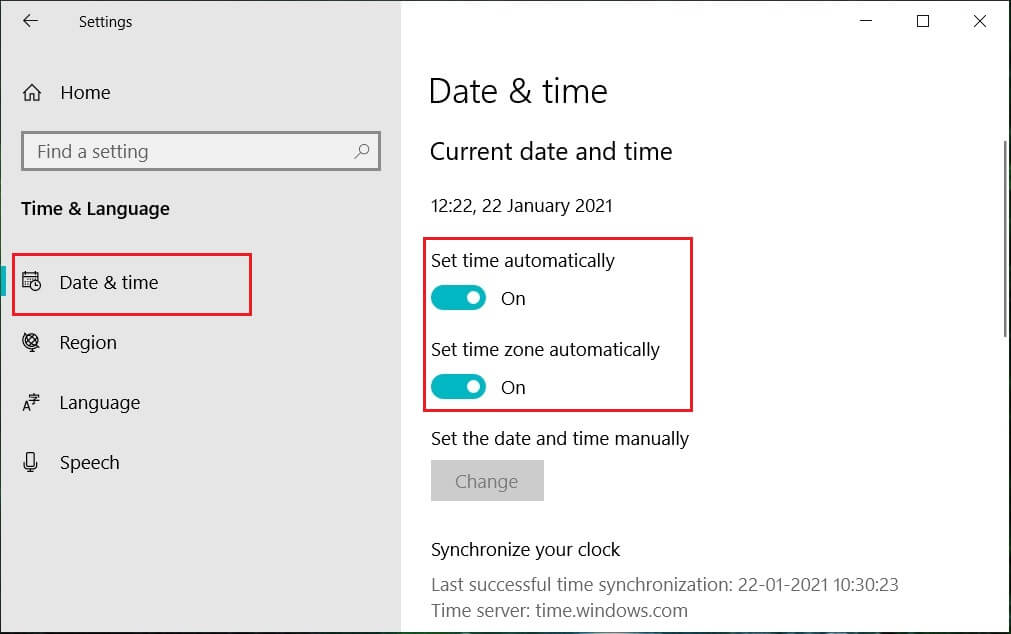
- Finally, restart the PC and try the installation process again.
Method 5: Repair System Files
Windows system components must be repaired error message can also be caused by missing or corrupted files. The system file checker will scan your entire system for corrupted files and repair them. Deployment Image Servicing and Management or DISM is a diagnostic & command tool and can act as a windows update components tool. This tool can also help in fixing corrupt & damaged files and repair Windows image files including windows update components. Follow our guide to repair system files on Windows 10 .

Hopefully, using this Windows update components tool has resolved the error. If not, you may need to reset the Windows system components.
Method 6: Reset Windows System Components
Here are the steps to reset Windows system components.
- Press Windows key , type Command Prompt and click on Run as administrator .

- Click on Yes to grant permission.

- Execute the following commands one after the other to stop BITS, Windows Update, and Cryptographic services:
net stop bits

net stop wuauserv

net stop cryptsvc
Note : Press enter after each command line.

- After that, execute the following command to delete the qmgr*.dat files.
Del "%ALLUSERSPROFILE%\Application Data\Microsoft\Network\Downloader\qmgr*.dat"

- Then execute the following command .
cd /d %windir%\system32

This is a bigger step, but don’t worry, it’s easy. To re-register the BITS and Windows Update files, you have to paste multiple commands one after the other shown in the next step below.
- Paste the following commands , then press the Enter key after each command.
regsvr32.exe atl.dll

regsvr32.exe urlmon.dll

regsvr32.exe mshtml.dll

regsvr32.exe shdocvw.dll

regsvr32.exe browseui.dll

regsvr32.exe jscript.dll

regsvr32.exe vbscript.dll

regsvr32.exe scrrun.dll

regsvr32.exe msxml.dll

regsvr32.exe msxml3.dll

regsvr32.exe msxml6.dll

regsvr32.exe actxprxy.dll

regsvr32.exe softpub.dll

regsvr32.exe wintrust.dll

regsvr32.exe dssenh.dll

regsvr32.exe rsaenh.dll

regsvr32.exe gpkcsp.dll

regsvr32.exe sccbase.dll

regsvr32.exe slbcsp.dll

regsvr32.exe cryptdlg.dll

regsvr32.exe oleaut32.dll

regsvr32.exe ole32.dll

regsvr32.exe shell32.dll

regsvr32.exe initpki.dll

regsvr32.exe wuapi.dll

regsvr32.exe wuaueng.dll

regsvr32.exe wuaueng1.dll

regsvr32.exe wucltui.dll

regsvr32.exe wups.dll

regsvr32.exe wups2.dll

regsvr32.exe wuweb.dll

regsvr32.exe qmgr.dll

regsvr32.exe qmgrprxy.dll

regsvr32.exe wucltux.dll

regsvr32.exe muweb.dll

regsvr32.exe wuwebv.dll
Note : Do not copy and paste all together, it will not work. You have to copy, paste and press enter key after entering each command.
- Type the following command to reset Winsock and press the Enter key .
netsh winsock reset

- Then, execute the following command to set the proxy settings if you are using Windows Server 2003 or Windows XP.
proxycfg.exe -d

- And lastly, to restart the BITS, Windows Update, and Cryptographic services, run the following commands one after the other:
net start bits

net start wuauserv

net start cryptsvc

- Finally, execute the following command to clear the BITS queue if you are using Windows Server 2008 or Windows Vista.
bitsadmin.exe /reset /allusers

Method 7: Reset Windows Update Components
Read our guide on How to Reset Windows Update Components on Windows 10 to do so.

Method 8: Reset PC
After trying every method and still couldn’t fix the windows system components error, then another option you can try resetting your PC or a clean installation. Follow our guide on how to reset Windows 10 without losing data .

Recommended:
- Fix Discord an Unknown Network Error in Windows 10
- Fix Scripted Diagnostics Native Host Not Working
- Fix Error 42127 Cab Archive is Corrupted
- How to Fix Error 0x3a98 in WlanReport
