
- How to Delete My Philo Account
- How to Deactivate Philo Account?
- How to Delete Philo Account through Amazon?
- How to Cancel Philo Account through Roku?
- How to Unsubscribe from Philo through Best Buy?
- What are the Extra Features of Philo?
- Which Devices Support Philo?
- Can Two People Use the Same Philo Account?
- Does Philo Offer a Free Trial?
- How Many Accounts Can You Have on Philo?
- Can Philo be Paused?
How to Delete My Philo Account
There are many individuals who want to deactivate Philo account because of different reasons. Live streaming services can be surprising, but none of them is perfect. While one may be amazing in one area and have benefits that another doesn’t have, it can also lack something that is really important to you. When it comes to Philo, there is no restriction for you to cancel your account whenever you want to.
How to Deactivate Philo Account?
Philo account can be easily deactivated or canceled online through the official website. It can be easily accessed from any web browser.
To cancel your Philo account, you must perform the following steps:
- Visit the Philo website on your browser.
Note : Make sure you are logged in to your account.
- Click on the profile icon from the top right corner.

- Then, click on the Account tab.

- Scroll down and click on Cancel my account .

- Select the desired reason to cancel your account and click on Cancel my account .
This is how you can deactivate Philo account.
Also Read : How to Delete Old Instagram Account
- Click on Profile icon > Account & Settings , as shown below.

- Click on the Channels tab.
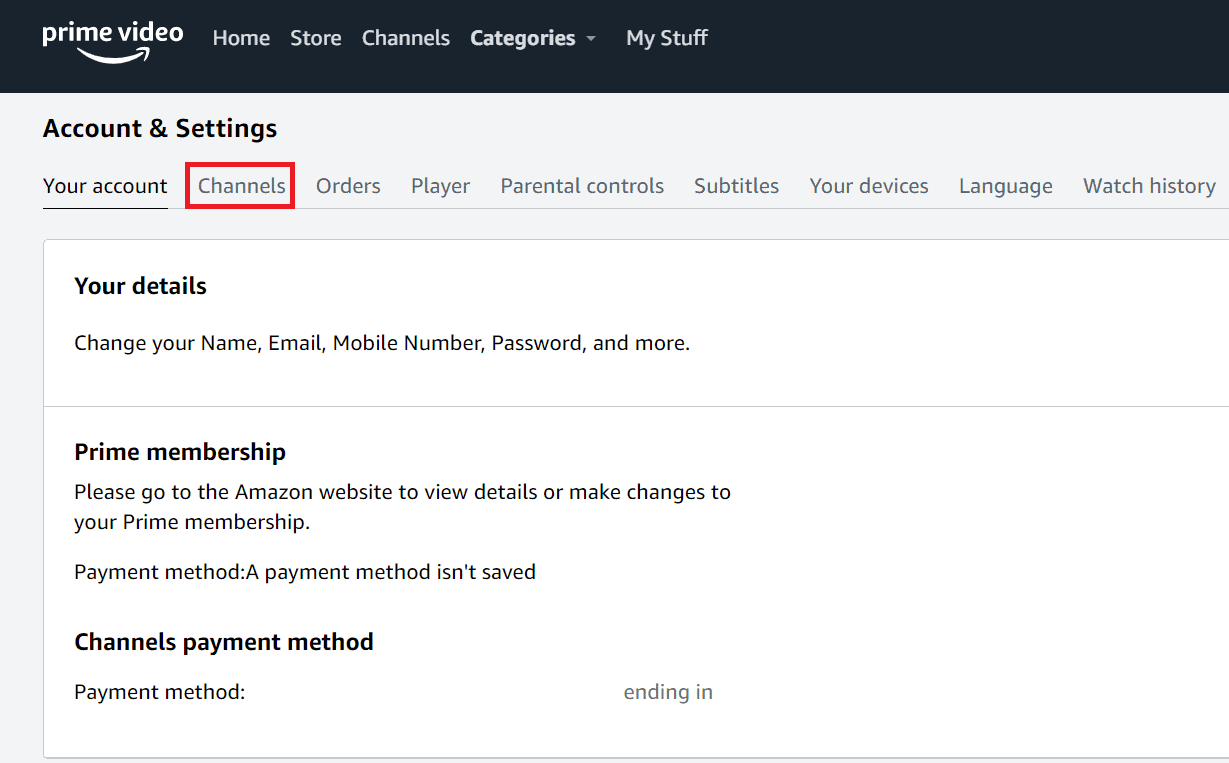
- Click on the Cancel Channel option next to the Philo channel .

- Now, click on Turn off auto-renew and watch until [renewal date] .
![click on Turn off auto-renew and watch until [renewal date] | - 8](https://techcult.com/wp-content/uploads/2022/06/click-on-Turn-off-auto-renew-and-watch-until-renewal-date-1-1.png)
- Choose the Prefer not to answer or any other desired option, as shown below.

How to Cancel Philo Account through Roku?
Visit the Roku Sign in page on your desktop browser.
Enter your Email and Password and solve the Captcha . After this, click on the Submit option.
Select Manage your subscriptions under Manage account on your Account page.

- Locate the Philo channel under Active Subscriptions and click on Cancel subscription .

- Select a reason for cancelation to complete the process.

What are the Extra Features of Philo?
- One thing that is great about this platform is that it offers its subscribers some great perks , even at a very low price .
- Philo offers to watch content on up to three different devices simultaneously . But unless you start watching it on a fourth device, the longest runny stream stops.
- All the live content is streamed in 720p, while on-demand comes in 1080p, which is more than ok for most TVs. Moreover, you should know that you can adjust the video quality automatically based on your internet speed .
- The live content comes with a 72-hour rewind , which means you can replay any content that has been aired within that timeframe. Otherwise, you can record any live content through unlimited DVR .
- There is no space limit, and you can also keep the recordings for up to one year .
- You can also skip the ads in the recordings, so you don’t have to watch those.
Read this article from the start to learn how to delete my Philo account.
Which Devices Support Philo?
Philo works on several devices, so you have a number of options through which you can enjoy all of the content. Here are the devices where Philo Works:
- Roku : all current models
- Apple TV : 4 th generation and up
- Chromecast : 2 nd generation and up
- Fire TV : all models
- Android TV : 5.0 and up
- PC : via Chrome, Safari, Firefox, Edge
- iOS : 14.0 and up or using Safari, Chrome, or Firefox
- Fire Tablets : 5.0 and up
- Mac : via Chrome, Safari, Firefox, Edge
Also Read : Which Music Apps are Unblocked at School?
Can Two People Use the Same Philo Account?
Yes . Philo offers three concurrent streams, which means that up to three people can watch on different devices at a time on the same account.
Does Philo Offer a Free Trial?
How Many Accounts Can You Have on Philo?
You can have up to 10 profiles with your own sign-in credentials, history, and settings. You can watch Philo on your PC using Chrome, Microsoft Edge, Safari, and Firefox.
Can Philo be Paused?
Yes , if you’d like, you can put your subscription on hold for up to 12 weeks. The good news is that you can always reactivate your account, which is really handy for anyone who might be traveling and won’t be able to watch the channel for a long.
Recommended :
- How to Check PayPal Login Activity
- How to Delete Facebook Dating Profile
- What If Your Uber Account is Deactivated Permanently?
- How to Delete Ebates Account
