Interacting with your friends just got a huge upgrade on Instagram! Now you can doodle, make animations, and send visuals right with your messages. This fun update has left many users wondering how they can also draw in their Instagram chats and DMs. Don’t worry, today we will show you where to find this cool new feature.

How to Draw in Instagram Chats and DMs
How to Draw in Instagram Chats and DMs
Now make your messages an art fest with different creatives.
- Open Instagram and tap on the message icon at the top right corner or the bottom ribbon.
- Select the user of your choice.
- Tap on the plus icon at the bottom right corner.
- Select Draw .
- Select any color from the palette box.
- Tap on the brush options from the ribbon.
- Tap on the undo icon to redo your last draw.
- Select the cross icon to discard the drawing.
- Then, tap on the send icon .
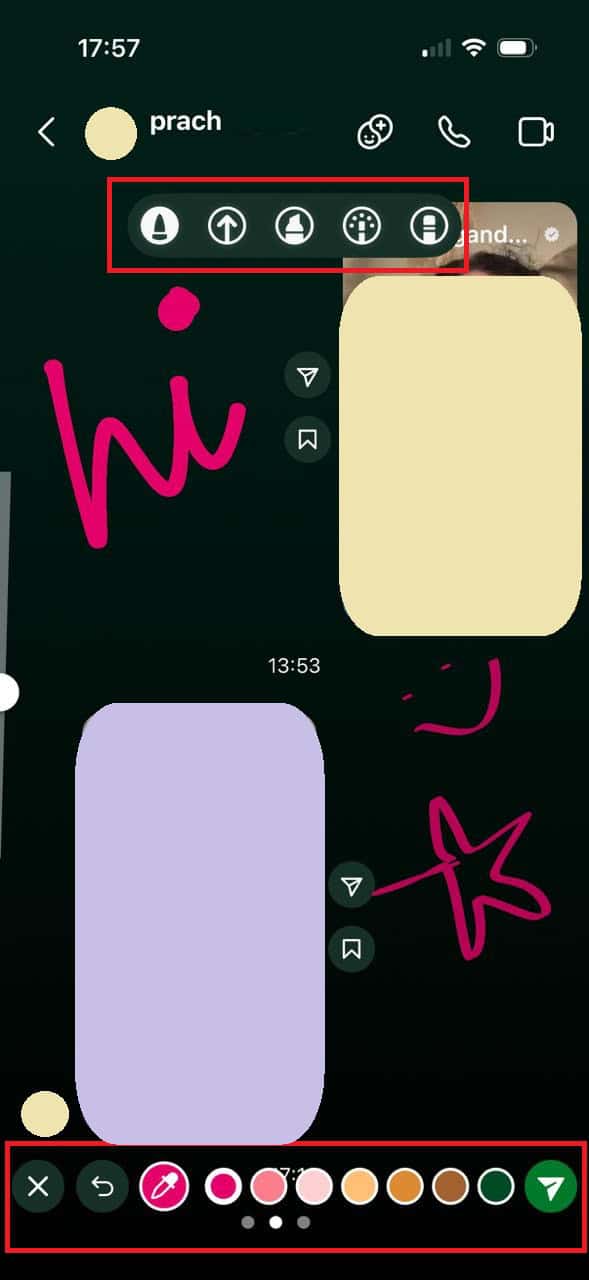
The doodles you draw will appear over the screen of both you and the user.
Why Can’t I See the Draw Feature in My Instagram DMs?
Since it is a very new update, Instagram is still rolling out the draw feature slowly amongst all users. Wait for some time or update the app to its latest version and check if you can find it.
