
- How to Speed up Amazon Firestick or FireTV Stick
- Method 1: Keep the Device Ventilated
- Method 2: Restart Firestick
- Method 3: Troubleshoot Network Connection
- Method 4: Clear Cache and Data
- Method 5: Turn Off Notifications
- Method 6: Turn Off Audio & Sound Autoplay
- Method 7: Disable Unused Services
- Method 8: Disable Automatic Updates
- Method 9: Uninstall Unused Apps
- Method 10: Turn Off Data Collection
- Method 11: Update Software
- Method 12: Perform Factory Reset
- Pro Tip: How to Conduct Firestick Speed Test
Below are some of the reasons for the slow processing of Firestick:
- Overheated device
- Over bloated device
- Unnecessary apps running in the background
- Updates running in the background
- Slow internet connectivity
Method 1: Keep the Device Ventilated
This might sound ridiculous, but keep the component cool and increase the speed of the Firestick.
- Try creating holes in the plastic case ensures air circulation in the hardware.
- Also, use original power adapter & charging cable to avoid overheating of device.
Method 2: Restart Firestick
Many issues with the system will be rectified by restarting the device. For your question about how to increase signal to Firestick, you might restart Firestick to see if it helps. Follow the steps below.
Go to Settings .
Select My Fire TV in the Settings menu.

- Select Restart in the MY FIRE TV menu.

Method 3: Troubleshoot Network Connection
If the issue persists even after restarting the device, then there may issue with the Internet. Try the following to resolve network issues:
- Try to switch to a premium VPN server like ExpressVPN .
- Check the network stability on other devices and reconnect to Firestick . If it doesn’t help, read how to fix Screen Mirroring Amazon Firestick Issues here .. If it doesn’t help, read how to fix Screen Mirroring Amazon Firestick Issues here ..
- Try to reboot your router & modem .
Method 4: Clear Cache and Data
Many apps might use the memory leading to the slowness of Firestick. If the Firestick continues to run slow even after uninstalling the unused apps, then try clearing the cache and data of other apps. Follow the given instructions.
Note: After clearing the cache and data, you will need to log in again to use the app.
Press the Home button .
Select Settings > Applications as shown.
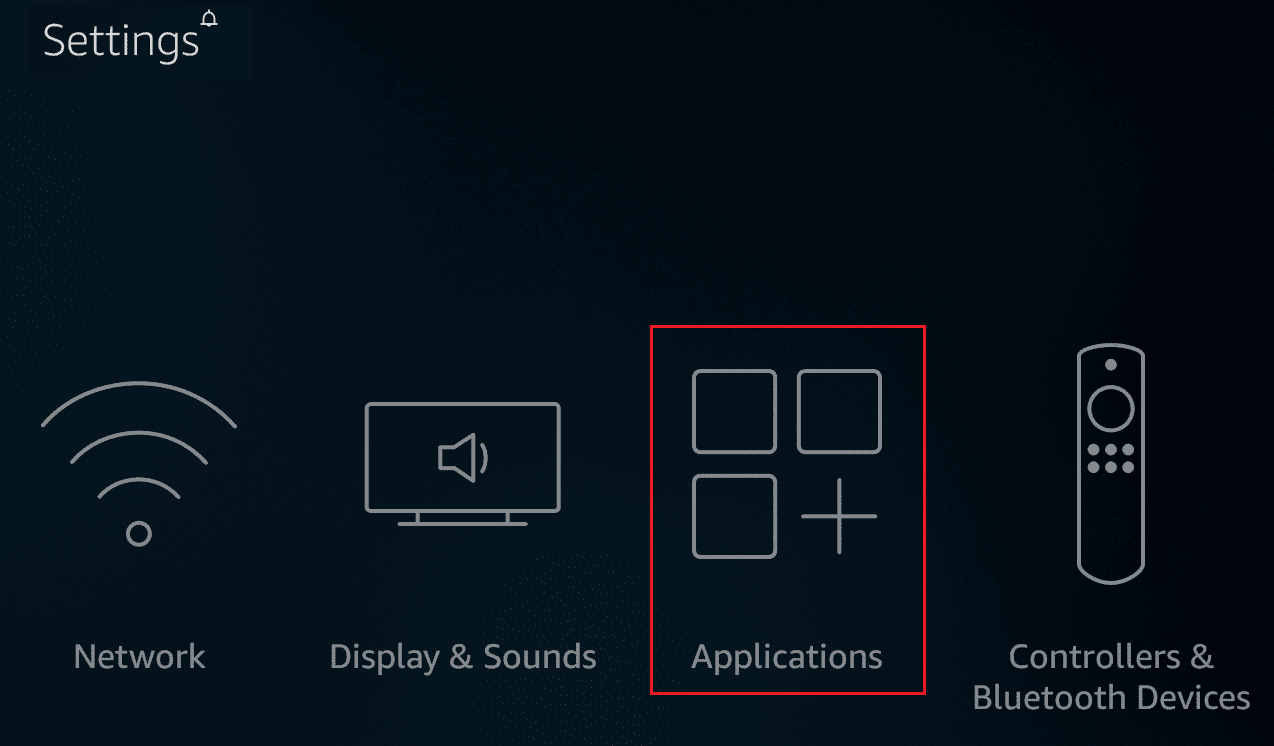
- Scroll down and select Manage Installed Applications .

- Select any application and click Clear data and Clear cache .
Method 5: Turn Off Notifications
Method 5A. Turn Off Appstore Notifications
Press the Home button .
Select Settings > Applications as shown.
- Click Appstore as shown highlighted.

- Scroll down and click Notifications to turn it Off.
Method 5B. Turn Off Individual Notifications
Press the Home button .
Select Settings > Preferences this time.
Select Notification Settings .
Click App Notifications on the next screen as shown.

- Now, click on the app to turn off the notifications for that app.
Method 6: Turn Off Audio & Sound Autoplay
If you pass on a thumbnail for a long time, it starts playing. This is helpful when you want to know the content of a movie or show. However, this may not help to speed up Firestick. Follow the steps below.
Press the Home button .
Select Settings > Preferences as earlier.
Click the option marked Featured Content .
Turn off the following options:
- Allow Sound Autoplay
- Allow Video Autoplay

Method 7: Disable Unused Services
Press the Home button .
Select Settings > Applications as depicted below.
- Then, select Prime Photos as depicted below.

Click on Allow Guest Connections and Access Prime Photos to turn them off.
Now, go to Applications as before and select GameCircle as shown.

- Click Whispersync for Games to turn it off.
Method 8: Disable Automatic Updates
The automatic updates feature is very useful to enjoy the latest version. However, enabling automatic updates will run in the background at all times. This would lead to checking the Firestick speed test. Therefore, it would be preferred to turn off automatic updates. Follow the steps below.
Press the Home button and go to Settings from the menu bar.
Select Applications .
- Here, select Appstore .

- Now, turn OFF the Automatic Updates .

Method 9: Uninstall Unused Apps
If multiple apps are running in the background, then this may lead to a shortage of memory resources. There may be sideloaded apps that monitor your connectivity and become a reason for slowing down Firestick. Follow the given instructions to uninstall unused apps quickly.
Press the Home button .
Select Settings > Applications .
Scroll down and select Manage Installed Applications as shown.
Scroll down to find the unused app . Select the app and click Uninstall .
Again, select Uninstall on the next screen to confirm.
Repeat the same to delete all unused apps .
Method 10: Turn Off Data Collection
Press the Home button and navigate to Settings > Preferences as earlier.
Select Privacy Settings as shown.

- Here, turn off the following options by clicking on them:
- Device Usage Data
- Collect App Usage Data
- Interest-based ads
- Next, go to Preferences and select Data Monitoring to turn it off, as illustrated below.

Method 11: Update Software
- Press the Home button on FireTV Remote shown highlighted.
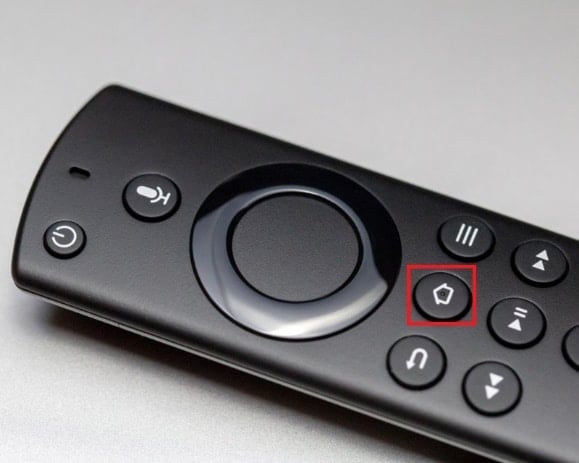
- Select Settings > My Fire TV menu option.
- Here, select the About option.

- Select the Check for Updates option as depicted below.

Method 12: Perform Factory Reset
If none of the methods above worked, then try this method as a last resort.
Note: Factory resetting will uninstall all the installed apps. Also, it will change the settings to default.
Press the Home button .
Select Settings > My Fire TV as shown.
- Select Reset to Factory Defaults .
Note: Enter the PIN when prompted.
- Lastly, click Reset button to confirm & begin resetting the device.

Pro Tip: How to Conduct Firestick Speed Test
You can also conduct a Firestick speed test to measure your internet speed. You can do the Firestick speed test using any one of the following options:
- Use the Internet Speed Test app from Amazon Store
- Use Analiti – Speed Test Wifi Analyzer from Amazon Store
- Go to fast.com from the Amazon Silk browser .
Follow the given steps to conduct Firestick speed test from fast.com:
- The website will start testing your network speed automatically and provide you with your internet speed .

Q1. What are the best free apps for Firestick?
Ans. Cinema APK, BeeTV, FilmPlus, CucoTV, CatMouse, and Nova TV are some of the free best apps for Firestick.
- For Standard Definition or SD content : minimum internet speed of 3 megabits per second (Mbps)
- For High-Definition or HD content : minimum internet speed of 5 megabits per second (Mbps)
Recommended:
- 90+ Hidden Android Secret Codes
- Fix Warframe Update Failed
- Where are Microsoft Teams Recordings Stored?
- Fix Steam Content File Locked Error
We hope that this article on how to speed up Firestick would have helped you. Send us your queries and suggestions in the comment section below. Let us know what you want to learn about next.
