
- Is DAZN Subscription Easy to Cancel?
- Is DAZN Easy to Cancel?
- Can You Cancel Anytime with DAZN?
- Can I Cancel My DAZN Subscription and Get a Refund?
- How Do I Cancel My DAZN Monthly Subscription?
- How to Cancel DAZN Subscription on Amazon?
Is DAZN Subscription Easy to Cancel?
Is DAZN Easy to Cancel?
Can You Cancel Anytime with DAZN?
It depends . If you opted for a monthly plan and you are directly paying DAZN , your account will automatically start a 30-day notice period. On the other hand, if you are an annual plan user or you are paying via a third party, you can cancel anytime you wish.

Also Read : How to Cancel Acorn TV Subscription
Can I Cancel My DAZN Subscription and Get a Refund?
No , DAZN will not refund you for the remaining period if you wish to cancel your subscription before it ends.
How Do I Cancel My DAZN Monthly Subscription?
If you want to take a break from your long binge-watching habit on DAZN, then it is time to know how do I cancel my DAZN monthly subscription.
Visit the DAZN website on your PC/laptop and Sign in to your account.
Click on MENU and select the My Account option.
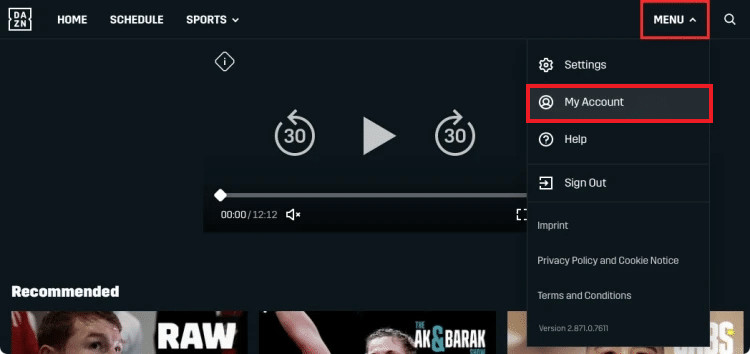
From the Subscription section, click on the CANCEL SUBSCRIPTION option.
Then, click on I STILL WANT TO CANCEL .

- Next, select the desired reason and click on CONFIRM CANCELLATION .
DAZN will send you a confirmation email once the cancellation process is completed.
Also Read : How to Cancel My Netflix Account

- Choose the Account & Profile Settings option.

- Then, select Prime Video .

- Now, click on Cancel Channel next to the DAZN channel, as shown below.

Then, click on Turn off auto-renew and watch until [renewal_date] .
Finally, click on Prefer not to answer or any other desired reason .
Q1. Is DAZN a monthly subscription?
Ans . Yes, you can go for DAZN monthly subscription.
Q2. Does DAZN give a free trial?
Ans . No, DAZN no longer offers a free trial although it used to do so in the past.
Q3. Can I cancel DAZN annual subscription?
Ans . Yes, you can delete DAZN annual subscription. Upon cancellation , you can still continue to use DAZN until the end of the 12-month notice period.
Recommended :
- How Do I Stop Chrome from Downloading a File in an Android
- Do You Need Wi-Fi for Chromecast?
- Do You Have to Cancel WWE Network?
- How Do You Cancel Your Disney Plus Account
