With its unbeatable customization, Discord ensures that everything you need is incorporated into the app through icons that serve as indicators and can help you recognize and distinguish various activities. The activity statuses are also part of this, as those are displayed as different symbols or icons. But it is tedious to remember what every icon means, isn’t it? In this article, we will see what the moon symbol and idle mean on Discord, which are the most used status symbols.

- What Does the Moon Symbol Mean on Discord?
- What are the Other Activity Status on Discord?
- How to Manually Set Idle Status on Discord App
- How to Set Custom Status on Discord
What Does the Moon Symbol Mean on Discord?
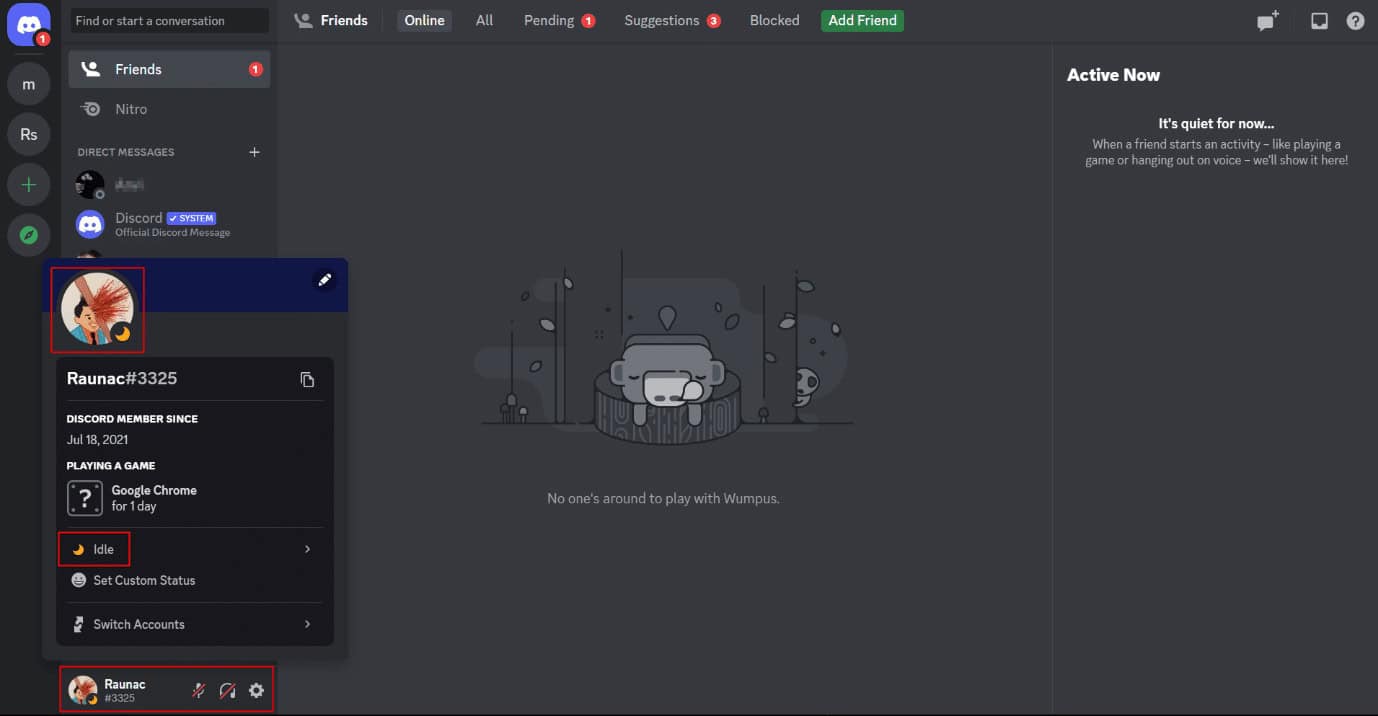
Acronyms have been a constant part of the communication language used on chat platforms. The moon or I would say the crescent moon on Discord is one of the symbols that represent the activity status of users . So, the little moon on Discord means Idle . Following the trend, the idle symbol can be represented by the acronym AFK (Away From Keyboard).
Discord’s activity status changes to idle after five minutes of inactivity even if the app is not closed. As the yellow crescent moon appears near the user’s name, it symbolizes the absence of the user while the app has been left running on the system. Take it as a representation of a break where the user would still continue to receive notifications and alerts , conditionally they haven’t disabled background notifications.
Also Read : What Does Silent Mean on Instagram DM?
What are the Other Activity Status on Discord?
Let’s not forget that there are these small effortless tweaks in Discord that make it comparatively attractive, elegant, and feature-rich. Discord does not only make its user know about the presence of a person when they one is online or on a break. There is more availability for it.
- Green dot : The green dot on Discord near the member’s name appears when the one is online and active .
- Red circle with a hyphen : This symbol on Discord represents Do Not Disturb which would ideally restrict all notifications from the Discord app.
- Hollow grey circle : The hollow grey circle means Invisible/Offline . The user may still have complete access to the Discord server and can interact with the app without letting others know about your presence i.e., appearing invisible .

How to Manually Set Idle Status on Discord App
So far in the article, we have learned about the Discord symbol meaning for different statuses. But can we manually change it as per our demands? Discord tracks the activeness of a user and automatically changes the status of the one from the default sets of activity statuses present on Discord. However, the user can also manually change the activity status on the Discord app as per requirements.
Open the Discord app on your phone.
Tap on the profile tab from the bottom right corner.
From the menu, tap on the Set Status option.

- Tap on Idle to enable the status.

The moon symbol, meaning Idle on Discord, can notify the other users that this specific user is inactive.
Also Read : How to Change Discord Status
How to Set Custom Status on Discord
It is worth noticing that Discord gives access to the users to set a custom activity status on their server. To set a custom status:
Click on the User ID from the bottom-left corner of the Discord desktop app .
Click on Set Custom Status .

- From the pop-up, enter a custom status message (you can also include emojis), set the time duration for the status to appear, and configure your status .

- Click on Save to confirm the changes. The custom status takes effect and appears below the User ID on the home screen and left panel of the servers.
Note: If you want to manually discard the custom status, click on the X icon next to your custom status in the pop-up menu.

Recommended :
- 12 Fun Event Ideas for Discord
- 17 Best AI Medical Diagnosis Apps
- What is Black Moon Emoji Meaning?
- What is Little Moon Next to Text on iPhone?
You might have noticed a little moon next to text on your iPhone, and surely you would have wondered what does that icon mean? Why is it here, and what does it indicate? There are many Google searches on light gray crescent moon iPhone as users are obsessively looking for answers about what is the exact function of this symbol. So today, we will explore all about the crescent moon with the detailed steps to get rid of the little moon next to text.

- What is Little Moon Next to Text on iPhone?
- What Does Crescent Moon Mean in iPhone Messages?
- What is the Meaning of Light Gray Crescent Moon Next to Someone’s Name in Text on iOS?
- Why is There a Moon Next To My Text on iPhone? What Does a Moon Next to a Contact Mean?
- What Do the Different Colors of the Half Moon Mean?
- How Do I Get Rid of the Crescent Moon on My iPhone 11?
- How Do I Remove the Moon Next to a Text?
What is Little Moon Next to Text on iPhone?
Read this article till the end to learn about the little moon next to text and also the steps demonstrating to disable it on iPhone using the illustrations for better understanding.
What Does Crescent Moon Mean in iPhone Messages?
While many signs or signals on your phone screen can put you in doubt, like the crescent moon in the Messages app on iPhone. The little moon next to the text in Messages means that the corresponding conversation has been muted . This option hides the alerts from the associated user on the iMessage app. Apple launched this feature so users can mute unwanted conversations , such as marketing offers or spam messages.
What is the Meaning of Light Gray Crescent Moon Next to Someone’s Name in Text on iOS?
There is nothing to worry about when you see the little moon next to a text or next to someone’s name in text on iOS. It is just an indication that you might have hidden the alerts for a specific conversation . And the Do Not Disturb mode with that particular contact has been switched on. There is also a Blue moon next to the text, which means a conversation is unread. As soon as you read the conversation, the Blue moon next to the text turns gray.
Why is There a Moon Next To My Text on iPhone? What Does a Moon Next to a Contact Mean?
The moon next to the text on iPhone means whenever the corresponding number would text you, the notification for it will not appear in the notification bar . It happens because the conversation with that particular person has been muted . It only happens with the particular contact you have enabled the Hide Alerts option. Also, this is completely reversible, and you don’t need to worry about it.
Also Read : What is Odin Mode on Samsung Phone?
What Do the Different Colors of the Half Moon Mean?
If you have been noticing different colored half moons on your iPhone screen , you have to understand that every colored moon holds a different meaning. Basically, you will see two colored half moons, named: Blue and Gray .
- Gray Moon : It means that you have muted the conversation with that particular person . Also, the gray moon on the status bar indicates that the Do Not Disturb mode has been switched on your iPhone.
- Blue Moon : If you observe a blue-colored moon in your iPhone messages, it means that a particular muted conversation has not been opened yet . In short, unread conversations and messages contain a blue-colored moon. As soon as you open these messages, the blue moon turns gray.
How Do I Get Rid of the Crescent Moon on My iPhone 11?
Along with the little moon next to text, the crescent moon appears on the iPhone Lock Screen . Follow the steps below to get rid of the crescent moon on your iPhone by turning off the Do Not Disturb mode:
Method 1: From Control Center
Below are the steps listed to disable the Do Not Disturb feature from the Control Center.
Pull down the screen to open the Control Center menu.
Tap on the crescent moon icon to turn off the Do Not Disturb feature.

Also Read : How to Turn Off AirPlay on iPhone
Method 2: From Settings
You can also turn off the Do Not Disturb mode from the iPhone settings menu , as explained below.
- Open the Settings app on your iPhone.

- Tap on the Do Not Disturb option.

- Tap on the Do Not Disturb toggle to turn it off.

Also Read : How to Disable Pop-ups on Safari on iPhone
How Do I Remove the Moon Next to a Text?
As pointed out earlier, the gray crescent moon next to a text on your iPhone is just an indication of the muted conversation. To unmute the conversation, follow the steps mentioned below.
- Open the Messages app on your iPhone.

Tap on the desired message for which the alerts have been hidden.
Then, tap on the i icon from the top right corner, as shown below.

- Tap on the Hide Alerts toggle to turn it off.

Recommended :
- Fix Error Printing in Windows 10
- Fix Unable to Install GarageBand on iOS
- How to Mark a Text Message as Unread on iPhone
- Fix iPhone Message Notification Not Working
